這是一個以 自由時報即時新聞 為基礎建立的 php plurk bot 範例
會貼出最新的10條新聞
2009年9月6日 星期日


2009年4月18日 星期六
[PHP 筆記] 發個私噗給自己
沒事發私噗給自己?
雖然 PLURK 有假期模式
但想保卡馬又沒時間噗浪
也不想造成他人的困擾
就想寫個程式
搭配 Windows xp '排定的工作'
成為定時發私噗的噗浪機器人
而這個私噗的內容只有自己可看到。
plurk_limit.php
<?
header('Content-type:text/html; charset=utf-8');
define('NICKNAME', ''); //輸入 PLURK 的 NICKNAME
define('PASSWORD', ''); //輸入 PLURK 的密碼
$user_id = getid(NICKNAME);
define('USER_ID', "$user_id");
set_time_limit(240);

// login
 $ch = curl_init();
 curl_setopt($ch, CURLOPT_RETURNTRANSFER, 1);
   curl_setopt($ch, CURLOPT_COOKIEJAR, '\plurk_cookie_n.txt');
   curl_setopt($ch, CURLOPT_URL, 'http://www.plurk.com/Users/login');
   curl_setopt($ch, CURLOPT_POSTFIELDS, 'nick_name='.NICKNAME.'&password='.PASSWORD);
   curl_exec($ch);
        curl_close($ch);

//

date_default_timezone_set("Asia/Taipei");
$out = date("Y-m-d H:i:s");
echo $out;
post($out);


function post($message){
  // post
 $ch3 = curl_init();
   curl_setopt($ch3, CURLOPT_COOKIEFILE, '\plurk_cookie_n.txt');
   curl_setopt($ch3, CURLOPT_URL, 'http://www.plurk.com/TimeLine/addPlurk');
   curl_setopt($ch3, CURLOPT_POSTFIELDS, 'qualifier=gives&limited_to=%5B'.USER_ID.'%5D&lang=tr_ch&uid='.USER_ID.'&no_comments=0&content='.$message);
   curl_exec($ch3);
     curl_close($ch3);
}


function getid($name){
 $ourl= 'http://plurk.com/'.NICKNAME;
 $fid = file_get_contents($ourl);
 preg_match('/user_id\": (.*?)\,/s',$fid,$matches);
 $u_id = $matches[1];
 return($u_id);
}

?>
上面
define ('NICKNAME', '1234'); 1234 改為你 PLURK 的 NICKNAME
define ('PASSWORD','5678'); 5678 改為你 PLURK 的密碼
如果噗同樣的內容
可能會被 Plurk 的防洪機制所阻擋
所以我把它設定為報時噗
排程的方式
以 AppServ 為例
首先要讓 php 支援 cURL 模組
我的排程是執行
D:\AppServ\php5\php.exe D:\AppServ\www\plurk\test\plurk_limit.php

切記!
每日超過 30 噗主題是會扣卡馬的
所以重複執行時間可不能設定太短喔。
順便打個小廣告
歡迎加入我的 機器人噗浪
.
[PHP 筆記]查詢某 PLURK NICKNAME 的 user id
首先要定義程式中的 NICKNAME如我的 NICKNAMEdefine('NICKNAME', 'never4get');
<?
define('NICKNAME', ''); // 在 '' 中輸入要查詢的 NICKNAME
$user_id = getid(NICKNAME);
echo $user_id;

function getid($name){
	$ourl= 'http://plurk.com/'.NICKNAME;
	$fid = file_get_contents($ourl);
	preg_match('/user_id\": (.*?)\,/s',$fid,$matches);
	$u_id = $matches[1];
	return($u_id);
}

?>
2009年2月17日 星期二
[學習筆記] PHP tinyurl 短縮網址 的 function
忘了之前在哪裡找到的
先記下來當做日後查詢的筆記。
tinyurl 可把冗長的網址簡化為較短的網址
下面為好用的 php function
其中:
$url 為欲轉換的網址
代入 function 後
返回值為轉換後的簡化網址
先記下來當做日後查詢的筆記。
tinyurl 可把冗長的網址簡化為較短的網址
下面為好用的 php function
function tinyurl($url){
   return(trim(file_get_contents('http://tinyurl.com/api-create.php?url='.$url)));
}
其中:
$url 為欲轉換的網址
代入 function 後
返回值為轉換後的簡化網址
2008年12月1日 星期一
台灣蘋果壹周刊程式修改
最近一些免費空間(如 http://www.000webhost.com/ )為了安全的理由
禁止了 ini_set() 的指令
而台灣蘋果網站一些頁面的抓取需要設定 user agent
所以今日修改程式
由原來的
改為 cURL 的指令
.
禁止了 ini_set() 的指令
而台灣蘋果網站一些頁面的抓取需要設定 user agent
所以今日修改程式
由原來的
ini_set('user_agent', 'Mozilla/4.0 (compatible; MSIE 6.0; Windows NT 5.1; SV1; .NET CLR 1.0.3705; .NET CLR 1.1.4322)');
改為 cURL 的指令
curl_setopt($ch,CURLOPT_USERAGENT,'Mozilla/4.0 (compatible; MSIE 6.0; Windows NT 5.1; SV1; Maxthon; Maxthon; .NET CLR 1.1.4322; .NET CLR 2.0.50727)');
.
2008年11月23日 星期日
PortableWebAp 啟用 cURL 模組的方法
1.
修改 WebAp\Program\php\php.ini
用文字編輯程式(UltraEdit or EmEdit)編輯
找到其中的 extension=php_curl.dll 這一行
去除前面的分號 ";"
然後儲存。
2.
下載 http://portablewebap.com/downloads/php5.1.6ext.zip
解壓縮後
找到 php_curl.dll copy 到 WebAp\Program\php\ext\ 下
3.
執行 portablewebap.exe 啟用 server.
修改 WebAp\Program\php\php.ini
用文字編輯程式(UltraEdit or EmEdit)編輯
找到其中的 extension=php_curl.dll 這一行
去除前面的分號 ";"
然後儲存。
2.
下載 http://portablewebap.com/downloads/php5.1.6ext.zip
解壓縮後
找到 php_curl.dll copy 到 WebAp\Program\php\ext\ 下
3.
執行 portablewebap.exe 啟用 server.
在 AppServ 中啟用 cURL 模組的方法
在 WINDOWS 的目錄下
找到 php.ini 這個檔
用文字編輯程式(UltraEdit or EmEdit)編輯
找到其中的 extension=php_curl.dll 這一行
去除前面的分號 ";"
然後儲存,
若仍然無法啟動 cURL 可以按照下面步驟修正。
一、在 ..\AppServ\php5\ 下找到 libeay32.dll 及 ssleay32.dll。
二、在 ..\AppServ\php5\ext\ 下找到 php_curl.dll。
三、將上述三個檔案複製到 %windir%/system32 下。
四、重新啟動伺服器即可。
找到 php.ini 這個檔
用文字編輯程式(UltraEdit or EmEdit)編輯
找到其中的 extension=php_curl.dll 這一行
去除前面的分號 ";"
然後儲存,
若仍然無法啟動 cURL 可以按照下面步驟修正。
一、在 ..\AppServ\php5\ 下找到 libeay32.dll 及 ssleay32.dll。
二、在 ..\AppServ\php5\ext\ 下找到 php_curl.dll。
三、將上述三個檔案複製到 %windir%/system32 下。
四、重新啟動伺服器即可。
2008年8月18日 星期一
Fiddler
今天介紹一個剖析網頁的工具~Fiddler
這個工具我覺得非常的好用而且它是免費的

Fiddler 的用途非常的廣泛
我以查詢 台灣自由時報週末版 的圖片原始位置來做範例:
- 先執行 Fiddler 程式
- 用瀏覽器開啟 http://www.libertytimes.com.tw/Service/weekly.htm 這個網頁
- 點選網頁上方 "放大看"按鈕,如下圖所顯示。
-

- 查看 Fiddler 內的記錄。
-
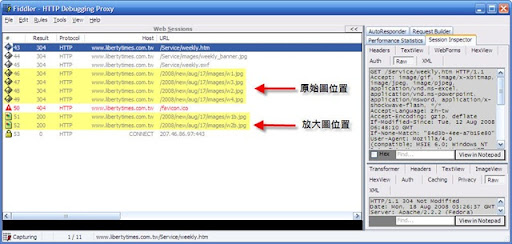
由上圖就可查出原始圖及放大圖存放的位置。
根據上面查出的位置
我寫了個小程式方便瀏覽及用 iSiloX 製作電子書
- <?
- $issue = $_GET['issue'];
- if($issue){
- //echo $day.$month;
- $content = 'http://www.libertytimes.com.tw/'.$year.'/new/'.$month.'/'.$day.'/';
- }else{
- $url = 'http://www.libertytimes.com.tw/menu2.js';
- $content = preg_replace('/(.*?)path = \"(.*?)\"(.*)/s',"http://www.libertytimes.com.tw$2",$content);
- }
-
- $out = "<title>生活週報</title><img src=http://www.libertytimes.com.tw/2008/images/img_auto/005/Weekend.gif><br><b>$matches[1]</b><hr>\r\n";
- if (!$weekly){
- $out .= "<b>今日週末版未出刊!</b>\r\n";
- }else{
- for ($i=1;$i<=12;$i++){
- if (($i == "4")||($i == "8")){$i = $i+1;}
- $link = $content."images/w".$i.".jpg";
- $blink = $content."images/w".$i."b.jpg";
- $out .= "<a href=$blink><img src=$link border=0 ></a><br>\r\n";
- }
- }
- $out .="<hr><img src=http://static.flickr.com/60/219160214_e6ed15d559_o.gif>";
- echo $out;
- ?>
演示: http://never4get.net78.net/ltw/ltweekly.php?issue=20080817
至於其他如 MagV 網站的內容也可比照上法查詢。
2008年8月12日 星期二
Time php v 1.1
Time 雜誌網頁 格式有少許更動
昨晚我把原來的程式也更新了
內定 time.php 為 U.S. edition
time.php?edition=asia 為亞洲版
分兩個檔案:
time.php
- <?
- $edtion = $_GET['edition'];
- $link = "http://www.time.com/time/magazine";
- $mylogo = "<img src=http://static.flickr.com/60/219160214_e6ed15d559_o.gif> <br>\r\n<font size=\"2\">time.php v1.1</font>";
- $edition = $edt[1];
- $uscover = $cv[1][0].'jpg';
- $asiacover = $cv[1][2].'jpg';
- $uslink = $link;
- $asialink = $el[1][1];
- $link = $uslink;
- $cover = $uscover;
- if ($edtion == 'asia'){
- $link = $dirlink.'/..'.$asialink;
- $cover = $asiacover;
- }
- $line = $head[0];
- $line .= "<b>$head[1]</b><br><img src=$cover>\r\n<hr>\r\n";
- for ($i=0;$i<$z;$i++){
- $area = $matches[0][$i];
- $line .= "<br>\r\n<b><font color=red>$h[1]</font></b><br>\r\n<ul>\r\n";
- for ($j=0;$j<count($t[0]);$j++){
- $title = $t[0][$j];
- $line .= "<li>$title</li>\r\n";
- }
- $line .= "</ul><br>\r\n";
- }
- $line .= "<hr>\r\n$mylogo";
- echo $line;
- ?>
time_view.php
- <?
- $link = $_GET['link'];
- $mylogo = "<img src=http://static.flickr.com/60/219160214_e6ed15d559_o.gif> <br>\n<font size=\"2\">time.php v1.1</font>";
- if ($nl[1]||$nl2[1]){
- $newlink = $nl[1];
- $newlink .= $nl2[1];
- $newlink = 'http://www.time.com/'.$newlink;
- }
- $title = $t[0];
- $area = $a[1];
- $line = $title."\r\n";
- $line .= $area;
- $allowed_tags = "<b>,<p>,<div>,<h1>,<span>,<title>,<br>,<hr>,<img>,<font>";
- $line .=$pix[0];
- $line .= "<hr>\r\n$mylogo";
- echo $line;
- ?>
Webmaster Tools - Advanced
2008年7月7日 星期一
SCMP php 原始檔公開
共分兩個檔
第一個檔為 scmp.php
用於顯示新聞標題
第二個檔為 scmp_view.php (2009-3-15 更新)
用於顯示新聞內文
Enjoy!
第一個檔為 scmp.php
用於顯示新聞標題
- <?
- $out = "<title>SCMP.com</title>\r\n";
- $out .= "<b><font size=5>SCMP</font></b><br>\r\n";
- preg_match('/<td colspan=\"3\" style="padding-top: 3px; font-size:12px;font-family:Arial\;\" align=\"center\" valign=\"middle\">(.*?)<\/td>/s',$main,$issue);
- $out .="$issue[1]<hr>\r\n";
- $baseurl = 'http://www.scmp.com/rss/';
- for($i=0;$i<5;$i++){
- $url = "$baseurl"."$l[$i].xml";
- $out .= "<p><b><font color=#656565>$tt[$i]</font></b><br>\r\n";
- $content = preg_replace('/<title>(.*?)<\/title>(.*?)<link>(.*?)<\/link>/s',"<li><a href=scmp_view.php?link=$3>$1</a></li>\r\n",$content);
- $out .= $content;
- }
- }
- $out .= "<hr><img src=http://static.flickr.com/60/219160214_e6ed15d559_o.gif>";
- echo $out;
- ?>
第二個檔為 scmp_view.php (2009-3-15 更新)
用於顯示新聞內文
- <?
- ini_set('user_agent', 'Mozilla/4.0 (compatible; MSIE 6.0; Windows NT 5.1; SV1; .NET CLR 1.0.3705; .NET CLR 1.1.4322)');
- $link = $_GET['link'];
- $content = $match[1];
- $headline = $hl[1];
- $subheadline = $shl[1];
- $art_date = $ad[1];
- $by_line = $bl[1];
- $body = $ab[1];
- $out .= "<title>SCMP.com $headline</title>";
- $out .= "<b><font color=#656565 size=5>$headline</font></b><br>\r\n";
- $out .= "$subheadline<br>\r\n";
- $out .= "$art_date<br>\r\n";
- $out .= "$by_line<hr>\r\n";
- $out .= "$body<hr>\r\n";
- $out .= "<img src=http://static.flickr.com/60/219160214_e6ed15d559_o.gif>";
- $allowed_tags = "<u>,<b>,<li>,<br>,<hr>,<img>,<font>,<p>,<title>";
- echo $out;
- ?>
Enjoy!
2008年7月2日 星期三
about SCMP 南華早報
自從 scmp.com 改版後
php 失效已經很久了
昨天瀏覽該網站
發現在每則新聞的原始 html 中
藏有除了圖片之外的完整新聞內容
不需訂戶登入即可截取其中的資料
今天花了點時間把程式寫出
新聞的標題由 rss 中抽取出
演示在下面網址
http://never4get.net78.net/scmp/scmp.php
訂閱:
文章 (Atom)